If you are building software in 2026, you are not choosing between "AI or no AI." You are choosing which AI layer sits on top of your editor, your repo, or your blank canvas. The market split into three camps fast: IDE agents (they live in your codebase), terminal agents (they run beside git), and generative app builders (they ship a prototype before you open VS Code).
This guide compares the tools I actually reach for on client work and my own products: Cursor, Claude / Claude Code, OpenAI Codex, Google Antigravity, Vercel v0, Bolt, Base44, plus a short list of honourable mentions. Pricing shifts often. Treat the numbers as direction, then verify on each vendor's site before you budget.
Developers care about context windows, diff quality, test runs, and whether the agent respects AGENTS.md / project rules. Founders care about time to demo, cost predictability, and how much technical debt they inherit on day thirty.
Neither group wins by picking the flashiest launch tweet. You win by matching the tool to the job: UI spike, greenfield MVP, brownfield refactor, or production hardening.
The three layers (quick mental model)
Layer
Examples
Best when
IDE + repo context
Cursor, Windsurf, Copilot in VS Code
You already have a repo and tests
Terminal / CLI agent
Claude Code, Codex CLI
You want scripted, repeatable agent runs
Browser app generator
v0, Bolt, Base44, Lovable
You need a clickable demo this week
Most serious products end up on layer one for maintenance, even if they started on layer three.
Cursor
What it is: A VS Code fork built around inline chat, Tab completion, and Composer (multi-file edits). It indexes your repo and treats the codebase as the source of truth.
Pros
Strong everyday flow for React, Node, TypeScript, and Python monorepos.
Composer is still one of the better "change five files safely" experiences in 2026.
Model choice (Claude, GPT, Gemini) without leaving the editor.
.cursor/rules and skills patterns map well to team standards.
Cons
Premium request caps on Pro can bite heavy agent users.
It will happily edit files you forgot were open unless your rules are tight.
Not a substitute for architecture reviews on payment or auth flows.
Pricing (typical 2026)
Hobby: free tier with limits.
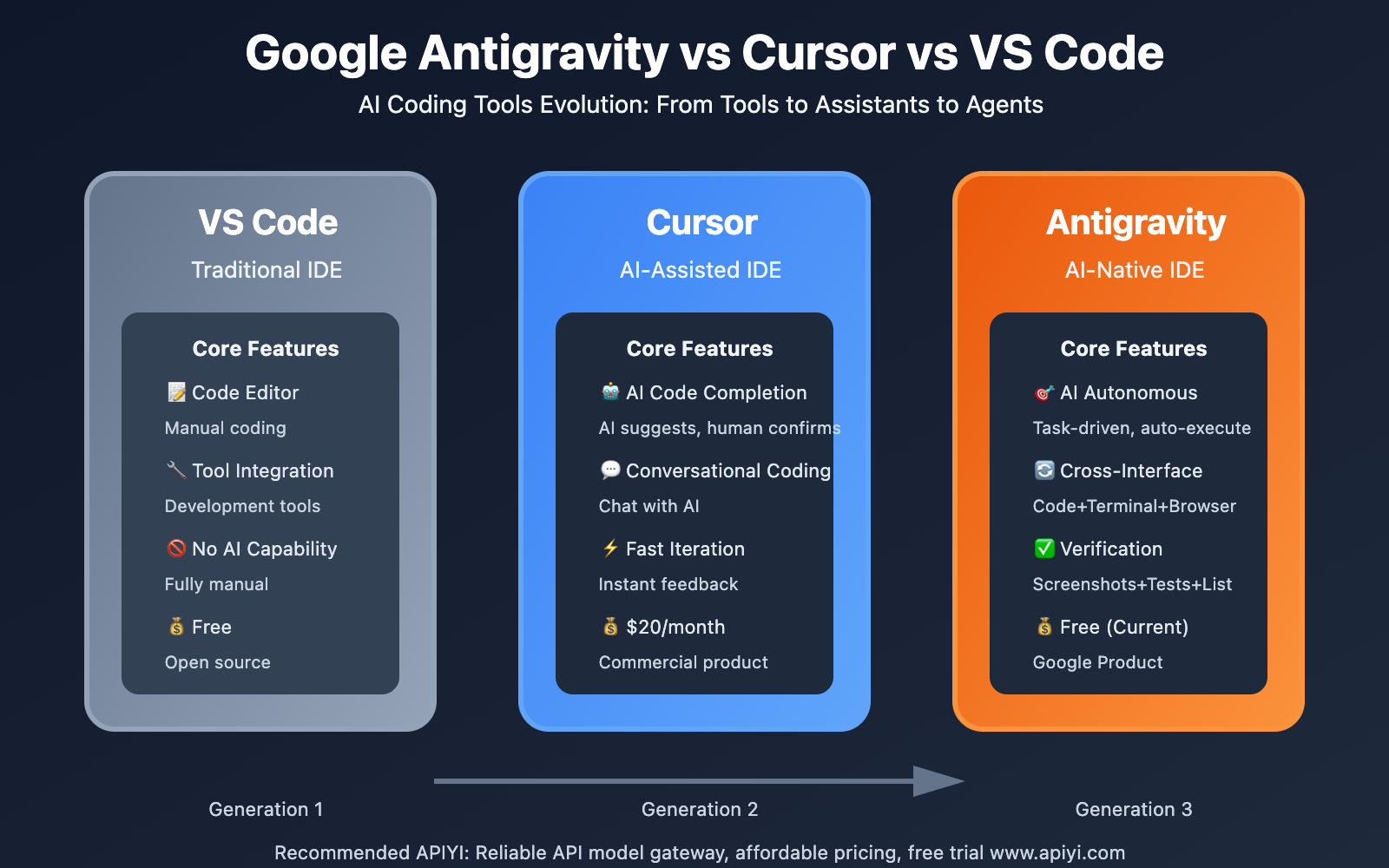
Pro: about $20/month (annual discounts common).
Pro+ / Ultra: higher tiers for multipliers on premium model usage.
Teams: per-seat pricing for shared rules and admin.
Best for: Working developers and small teams with an existing repo. As an app development company workflow, Cursor is where I spend most implementation hours after the PRD is clear.
Claude and Claude Code
What it is:Claude (chat + projects) for reasoning, specs, and reviews. Claude Code is Anthropic's terminal agent: read repo, run commands, open PRs, follow CLAUDE.md.
Pros
Excellent at reading large specs and turning them into phased implementation plans.
Claude Code feels close to a senior engineer in SSH: grep, edit, run tests, iterate.
Long context helps on brownfield refactors when you point it at real folders, not pasted snippets.
Strong writing voice for docs, support macros, and in-app copy (with human edit).
Cons
Subscription limits on Opus-class models during busy weeks.
Terminal agents need discipline: branch strategy, CI, and "do not push to main" rules.
Browser-only Claude does not replace local builds for mobile or native modules.
Pricing (typical 2026)
Pro: about $20/month for Sonnet/Opus access in chat.
Max tiers: roughly $100–200/month for heavier Claude Code usage.
API: token billing if you embed Claude in your own product.
Best for: Developers who want deep reasoning and a credible CLI agent. Founders can use Claude Projects for PRDs, but shipping still needs a dev environment or a builder tool below.
OpenAI Codex
What it is: OpenAI's coding agent line (cloud and CLI flavours have evolved quickly). Think task-oriented agent: implement ticket, fix test, propose patch, often tied to ChatGPT Plus/Pro or API billing.
Pros
Tight integration if your team already standardises on OpenAI models and ChatGPT Enterprise.
Good at small, well-scoped tasks with clear acceptance criteria.
API path is natural if you are building your own internal dev bot.
Cons
Less "IDE native" than Cursor unless you wire it yourself.
Quality still depends on how crisply you write the task boundary.
Competes with Claude Code in the same terminal slot; teams rarely need both as defaults.
Pricing (typical 2026)
Bundled with ChatGPT Plus/Pro tiers for consumer-style access.
API: per-token for automated pipelines.
Check OpenAI's current plan matrix; naming changed across Codex / GPT-5 era launches.
Best for: Teams already on OpenAI billing who want an agent beside GitHub Issues or Slack, not founders sketching a marketplace from zero.
Google Antigravity
What it is: Google's IDE-style agent experience (built on the Gemini stack) aimed at multi-step agent workflows in a Google-flavoured dev environment. Positioned against Cursor and Claude Code as "agent-first IDE."
Pros
Strong if you live in Google Cloud, Firebase, or Android/Kotlin adjacent stacks.
Gemini model updates land here first for Google-centric teams.
Useful for prototypes that may deploy to GCP without a context switch.
Cons
Smaller third-party plugin ecosystem than VS Code/Cursor for some niches.
Team adoption is newer; fewer public playbooks than Cursor in 2026.
Still requires your own standards for secrets, .env, and production keys.
Pricing (typical 2026)
Often tied to Google AI Pro/Ultra or Cloud trial credits.
Verify current Antigravity access rules; Google bundled and rebranded rapidly in this cycle.
Best for: Developers standardising on Google Cloud and Gemini. Less proven as a default for custom software development shops mixed across AWS and Azure unless you are committed to GCP.
Vercel v0
What it is: Prompt-to-UI for React / Next.js surfaces, leaning on shadcn-style components and Vercel deployment paths.
Pros
Fastest honest path from words to a polished landing or dashboard mock.
Output is usually real TSX, not a mystery JSON blob.
Pairs naturally with Vercel hosting and Next.js App Router patterns.
Cons
Front-end biased. You still need APIs, auth, payments, and data models elsewhere.
Credit-based pricing can spike during heavy iteration.
Easy to accumulate UI variants nobody merged into one design system.
Pricing (typical 2026)
Free tier with monthly credits.
Premium near $20/month with matching credit pools.
Team seats scale per user.
Best for: Founders and designers proving layout and copy. Developers use it to spike components, then port into the main repo. I have written about a similar v0 workflow for client sites before.
Bolt (bolt.new)
What it is: Browser-based full-stack generator: prompt, get a running app (often Vite/React plus a backend stub), iterate in the tab.
Pros
Incredible for demos at investor meetings or WhatsApp stakeholder reviews.
Lowers the "empty repo" fear for non-technical founders.
Can export or continue in a local IDE depending on the current Bolt feature set.
Cons
Token burn on ambitious prompts.
You must plan the migration path to your real repo and CI.
Complex domains (NFC, offline sync, regulated data) still need a senior engineer.
Pricing (typical 2026)
Free tier with token caps.
Pro near $25/month for higher limits and branding removal.
Heavy weekly usage often lands closer to $50–75/month in practice.
Best for: Founders validating UX. Not a replacement for a software development company South Africa engagement when you need Paystack, RLS, and maintainable architecture.
Base44
What it is: AI-assisted app builder leaning internal tools, CRUD, and "replace the spreadsheet" products, with generated code under the hood.
Pros
Fast path to admin panels and ops dashboards.
Good language for ops teams who already think in tables and approvals.
Less intimidating than handing a founder a raw monorepo on day one.
Cons
Custom mobile experiences and app-store polish are outside the sweet spot.
You still own security rules, roles, and data residency thinking for SA clients.
Vendor lock-in risk if you never export to your own git remote.
Pricing (typical 2026)
Tiered SaaS; check Base44 directly for seat and generation limits.
Budget extra for domain, email, and payment integrations not included in base plans.
Best for: Internal tools and SME digitisation. Pair with a developer for production hardening before you call it "done."
Honourable mentions (2026)
GitHub Copilot: Still the default inline completer in vanilla VS Code. Cheaper cognitive load for boilerplate; weaker than Composer-style multi-file agents for large features.
Windsurf (Codeium): Aggressive pricing and agent flows; worth a trial if Cursor caps frustrate you.
Replit Agent: Strong when the whole team lives in Replit; good for education and quick APIs.
Lovable / similar: Same lane as Bolt for generated full-stack; compare export story and pricing caps.
Figma + AI plugins: Not code, but part of the web design pipeline before development starts.
Founders vs developers: pick one primary tool
If you are…
Start here
Add within 30 days
Non-technical founder
Bolt or Base44 for demo
Hire or contract for repo + payments
Solo developer
Cursor + Claude Code
v0 for UI spikes only
Agency team lead
Cursor + shared rules
CI gate + human review on auth
Mobile (React Native)
Cursor + platform docs
Avoid pure browser builders for store builds
The failure mode in 2026 is not "AI wrote bad code." It is no owner for schema migrations, secrets, and release discipline.
How I use these on real client work
I am Ayabonga Qwabi, a senior product engineer based in Queenstown, Eastern Cape, with about ten years shipping on GCP, AWS, and Azure. My stack is React, Node, TypeScript, Python, plus Supabase and Firebase when the product needs speed.
Typical week:
Claude for PRD tightening and risk notes (payments, POPIA-aware data handling).
Cursor for implementation, tests, and refactors in the client's repo.
v0 only when we need a visual argument before we merge into the design system.
Bolt only for founder workshops, never as the production source of truth.
That mirrors how a serious mobile app development or platform engagement should run: AI accelerates typing; architecture and accountability stay human.
Pricing realism for South African builders
Exchange rate swings matter. A $20 tool is not trivial in ZAR if you stack four subscriptions. My advice:
One IDE agent (Cursor or Antigravity if you are GCP-heavy).
One reasoning subscription (Claude Pro or equivalent).
One generator only while validating (v0 or Bolt), then cancel.
If you are hiring a custom software development partner, ask which tools they standardise on and what you will own if the engagement ends. You want the repo, the cloud account, and the CI pipeline in your name.
Security and compliance (do not skip)
Any tool that uploads your repo or runs terminal commands needs:
Secrets in environment variables, never in prompts.
A rule file that forbids committing .env or customer exports.
Branch protection on main.
Human review on auth, webhooks, and payment routes.
AI does not know your POPIA obligations. Your process does.
What I would not do in 2026
Ship Paystack or card data flows with zero human review.
Let an agent rotate API keys without an audit log.
Call a Bolt tab "production" without backups and monitoring.
Pick tools based on launch hype instead of export and git ownership.
Summary table
Tool
Type
Sweet spot
Watch out for
Cursor
IDE agent
Daily engineering
Usage caps
Claude Code
Terminal agent
Refactors, specs
Needs git discipline
Codex
OpenAI agent
OpenAI shops
Less IDE-native
Antigravity
Google IDE agent
GCP/Gemini teams
Newer playbooks
v0
UI generator
Landing/dashboard
Not full backend
Bolt
Browser full-stack
Fast MVP demo
Migration debt
Base44
App builder
Internal/CRUD tools
Mobile edge cases
Next step
If you want a shipped product, not just a generated demo, scope the work properly. Use the project scope estimator on this site for a structured brief and budget ballpark, or message me on WhatsApp with what you are building and your timeline.
For engineering services (platform work, integrations, cloud architecture), see Services. For industry-specific builds, browse solutions such as marketplaces, fintech, and health tech pages.
I help South African founders and teams turn AI speed into production discipline, without agency overhead.